


Vocalist: Learn to Sing
4.426.00 Reviews
App Specs
- Version
- 2.2.17
- Updated On
- License
- Free
- Downloads
- 10,000+
- Developer
- Lamarde Limited
- Categories
- Music & Audio
- Platform
- Android
Screenshots
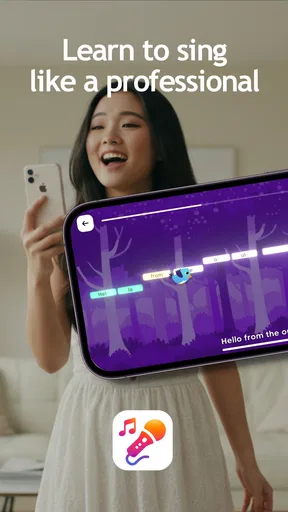
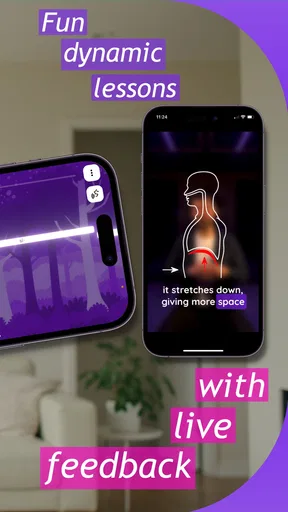
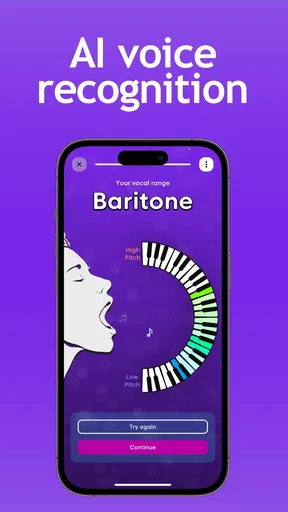
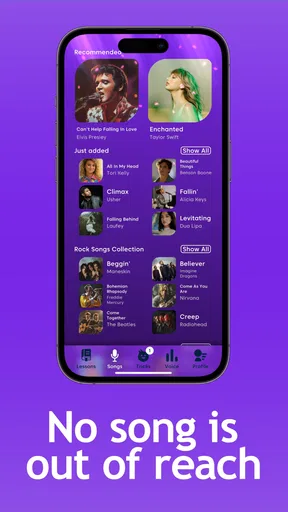
 Analysis by AppCompare
I approached Vocalist: Learn to Sing as a practical music and audio companion rather than just another vocal exercise app. Its focus is clear from the first impression: it is meant to help me work on singing, build a repeatable practice habit, and turn a spare moment into something more useful than casually humming along to a song. That makes it appealing to beginners, occasional singers, and anyone who wants a simple way to put vocal practice into a daily routine.
Lamarde Limited has kept the idea easy to understand. The app is free to start, aimed at Everyone, and runs on devices using Android 8.0 or later. It has reached over 10 thousand installs, with a 4.4 average from 296 ratings and 26 written reviews. Those figures suggest a modest but positive user base, although I would treat them as an encouraging sign rather than proof that it will suit every voice or learning style.
What I like most is the app’s narrow purpose. It is not trying to be a full recording studio, a social karaoke network, or a replacement for a singing teacher. That focus can be useful. When I open it, I am more likely to think about pitch, control, and consistency instead of getting distracted by endless song browsing. At the same time, anyone expecting detailed vocal diagnosis or a complete path from rough idea to finished release may find the experience limited.
Starting with a realistic singing goal
The best way to use Vocalist is to begin with a small, specific intention. “Become a better singer” is too broad to guide a short session. I get more from it when I decide that I want to improve one thing: matching notes more reliably, warming up before recording, becoming less hesitant in a higher range, or simply singing with greater confidence. The app works better as a focused practice tool than as a magic shortcut.
A realistic everyday scenario would be a ten-minute session before a rehearsal or a private recording. I might start by choosing a comfortable song or vocal line, spend a few minutes checking how steadily I can follow the notes, and then repeat the difficult passage rather than singing the entire piece over and over. That approach turns the app into part of a workflow: identify a weakness, practise it, listen again, and decide what deserves attention next time.
Beginners should not feel pressured to sing loudly or reach impressive notes immediately. A quiet, comfortable starting range is more useful than forcing the voice upward. I found that the app makes the most sense when I treat early sessions as observation rather than performance. If a note feels strained, that is a reason to adjust the exercise or stop, not a challenge to push harder.
There is also a useful distinction between learning to sing and preparing a polished vocal take. Practice apps can help me notice whether I am near the intended pitch, but they cannot replace good breathing habits, healthy posture, musical phrasing, or feedback from an experienced person. Vocalist is therefore most valuable at the beginning of the creative process, when I am building awareness and deciding what to work on before making a recording.
Worth Reading Before You Choose

Switching to Android Auto Means Rethinking Your Driving Routine

Google Calendar Makes a Crowded Week Easier to Manage

Baby Panda World Brings Quick Play to Modern Phones, but Its Game Library Feels Busy

ESPN’s Live Game View Makes Following Close Games Easier

QuizzLand Review: A Good Fit for Short Trivia Breaks, Not Every Player

Basketball Stars: Multiplayer Is Fast, but Can It Recover When Matches Go Wrong?
One practical tip is to keep the first session deliberately short. New singers often use too much effort because they are concentrating intensely, and that can make the voice tired before any real learning happens. I prefer several calm repetitions with a break between them. The app becomes more informative when I can compare a fresh attempt with a tired one and recognize whether the problem is technique, attention, or simple vocal fatigue.
How it fits into a making process
For me, the useful workflow starts before I press any practice control. I choose the material, decide what success means for that session, and keep the phone positioned consistently. A changing distance from the microphone can make results feel inconsistent, especially when I move closer for quiet notes or pull away for louder ones. Keeping the setup stable makes any comparison more meaningful.
I also recommend practising a troublesome phrase in isolation instead of repeatedly completing an entire song. Full-song runs are enjoyable, but they can hide the exact moment where pitch or control slips. Short sections let me repeat the same musical idea with less wasted effort. Once the phrase feels more secure, I can return to the wider passage and check whether the improvement survives in context.
This is where the app’s simple identity helps. I am not opening a complicated arrangement screen or managing multiple tracks before I have sung a note. The attention stays on the vocalist. For someone who gets overwhelmed by recording software, that lower barrier is a genuine advantage. I can use it as a first step before moving into a more advanced setup for editing or publishing.
The trade-off is that a focused practice app does not automatically provide the wider creative tools found in karaoke platforms, digital audio workstations, or lesson services. If I want to change backing tracks, build harmonies, apply detailed effects, arrange a complete performance, and deliver a finished audio file, I would need another tool in the chain. Vocalist can support the preparation stage, but it should not be mistaken for the whole production process.
That limitation is important for creators. I would use the app to prepare my voice before opening a recorder, not as the final destination for a song project. A singer making a demo might practise the chorus here, note which notes need attention, and then record the actual take elsewhere. This division of labor keeps the app useful without expecting it to do jobs it was not designed to handle.
Repeating attempts without losing perspective
Iteration is where a singing tool earns its place. One attempt tells me very little because nerves, room noise, tiredness, and a poor starting breath can all affect the result. The more useful question is whether I can repeat the same phrase with fewer corrections and less physical tension. I try to change one variable at a time: slower delivery, a lower starting key, softer volume, or a more deliberate breath.
A non-obvious benefit of this approach is that it separates pitch accuracy from confidence. I may technically reach a note while sounding hesitant, or sing with energy while drifting away from the intended pitch. Repeating a phrase with different levels of volume helps reveal which issue I am actually dealing with. That is more productive than assuming every imperfect result means I simply need to “sing harder.”
I would also avoid judging progress solely by a single visual or immediate result. A practice app can encourage me to chase a clean score or a satisfying response, but singing is not only about landing on isolated notes. Timing, vowel shape, breath support, expression, and the ability to connect notes matter too. I use the app as one source of feedback, then listen to myself normally and ask whether the phrase sounds natural.
For higher notes, I find it safer to work upward gradually rather than starting at the edge of my range. Begin where the voice feels relaxed, repeat the pattern, and only then test a slightly higher point. If the throat tightens or the sound becomes forced, the useful iteration is to step back. This is one of the situations where a human teacher is better equipped to identify a technical problem than an app alone.
Another practical habit is to keep a simple written note after each session. I might record the phrase I worked on, what adjustment helped, and whether my voice felt comfortable afterward. That turns separate app sessions into a longer creative process. Without some form of reflection, it is easy to repeat the same exercise mechanically and mistake activity for improvement.
Users should also remember that phone microphones are not neutral judges. Room reflections, background sounds, and the phone’s position can influence what the app detects. A quiet room and consistent placement will produce more useful comparisons than moving around a noisy space. This does not make the tool unreliable; it simply means I need to control the parts of the setup that I can control.
From practice to a finished creative handoff
Vocalist becomes most useful in a broader handoff process. I can use it to prepare before recording a cover, a demo, a rehearsal guide, or a vocal idea that will later be edited in another application. The handoff is cleaner when I decide in advance what I am carrying forward: improved pitch confidence, a memorized section, a more comfortable key, or a clearer sense of where the performance still needs work.
If my goal is publishing, I would not rely on this app alone. A publishable track normally needs recording, editing, balance, and a final check on headphones or speakers. Those stages belong in a dedicated audio editor or recording environment. The sensible workflow is to practise here, record the strongest take elsewhere, and then use the production tool for trimming, arrangement, effects, and delivery.
This makes the app a good fit for creators who want to reduce wasted recording time. Instead of capturing many takes without knowing why they fail, I can isolate the vocal challenge first. That can be especially helpful when I am working with limited time or when repeated full performances make my voice tired. Preparation does not guarantee a perfect take, but it can make the recording stage more deliberate.
There is a financial consideration as well. The app is free, with in-app purchases listed at $6.99 per item. I would begin with the free experience and decide whether any paid element genuinely improves my routine before spending money. For a casual singer, paying may not be worthwhile if the app is only opened once in a while. For someone practising regularly, a paid addition could make more sense if it directly supports a repeated workflow, but the value depends on how consistently I use it.
Device compatibility is straightforward for many people because Android 8.0 is the minimum operating system. The current version is 2.2.17, so I would still keep the app updated when possible, particularly if I use it as part of a regular practice setup. A stable routine matters more than having a large collection of tools, and an app that is easy to reopen and use is more valuable than one I abandon after an ambitious first session.
Compared with a karaoke app, Vocalist feels more purposeful and less entertainment-led. Karaoke is better when I want a large song library, backing tracks, and a performance atmosphere. Compared with a digital audio workstation, it is much simpler and far less suitable for editing or publishing. Compared with video lessons, it offers a more hands-on practice loop but less personal explanation. I would choose it when I want focused vocal work without the complexity of production software.
Who will benefit, and who should choose something else
I think the strongest audience is the beginner who wants structure without committing immediately to lessons, the casual singer preparing for a small performance, and the creator who needs a warm-up and pitch-focused step before recording. It can also suit someone returning to singing after a long break, because the narrow purpose makes it easier to start with manageable exercises instead of trying to build a complete artistic identity at once.
I would be more cautious about recommending it to advanced singers who already understand their vocal technique and need detailed analysis. It is also not the right primary choice for a songwriter looking to arrange a complete track, a producer who needs multitrack editing, or a performer whose main priority is social karaoke. Those users will probably get more from specialized recording, lesson, or performance platforms.
People with persistent pain, hoarseness, or unusual vocal strain should not treat an app as a diagnosis or medical solution. The sensible response is to rest and seek qualified professional advice. No pitch practice tool can tell me everything about vocal health, and pushing through discomfort to achieve a better result is a poor trade-off.
Privacy and concentration are practical considerations too. I would practise in a place where I can sing without feeling watched, and I would avoid turning every session into a public performance. The most productive use is often private and repetitive: a few careful attempts, a short rest, and a note about what changed. That may sound less exciting than sharing a result, but it is more likely to improve the underlying skill.
Released on March 11, 2026, the app is still best approached as a focused tool rather than a mature all-in-one music platform. Its 4.4 average is encouraging, and the Everyone rating makes it approachable for a broad audience, but neither point removes the need to test whether its practice style matches my own voice and goals. I would give it a fair trial through several short sessions instead of deciding after one rushed attempt.
My creator verdict
My overall view is positive, with clear boundaries. Vocalist: Learn to Sing works best as the practice and preparation layer in a larger creative workflow. It gives me a reason to focus on the singer before worrying about the recording, and that is a valuable order of operations. When I use it to isolate phrases, repeat them calmly, and carry the lessons into a separate recording tool, it feels practical rather than decorative.
I would recommend it to a friend who wants to sing more confidently but does not yet need a full studio. I would tell that friend to keep sessions short, maintain a consistent microphone position, work on one target at a time, and judge progress by repeatability and comfort rather than by one impressive attempt. Those habits make the app more useful than simply opening it and singing through a favorite song.
The main weakness is also its defining characteristic: the focused experience may feel too narrow once I want to edit, arrange, publish, or receive detailed coaching. That is not a reason to dismiss it; it is a reason to place it correctly. As a companion for starting a vocal idea, refining a difficult passage, and preparing a stronger handoff to recording software, it earns a place in my toolkit. As a complete music-production solution, it does not.
In the end, I see it as a low-friction way to make singing practice more intentional. The free entry point lowers the risk, the modest system requirement keeps it accessible, and the positive user response gives it a reasonable first impression. I would choose it when the creative task begins with my voice and the next step is improvement, not publication. For that specific job, it is focused, approachable, and worth trying.
Pros
- Clear vocal exercises make daily practice easy to follow.
- Useful for beginners building pitch and breath-control fundamentals.
- Short sessions fit conveniently into a regular practice routine.
- Progress-focused lessons can encourage consistent singing practice.
- Works well as a private warm-up tool before rehearsals or performances.
Cons
- Advanced singers may find the lesson content too basic.
- Vocal results depend heavily on consistent
- correct practice.
- Some features or lessons may require a paid subscription.
- Phone microphones can affect the accuracy of pitch feedback.
- The app cannot replace personalized guidance from a vocal teacher.
FAQs for Vocalist: Learn to Sing
What is Vocalist: Learn to Sing, and who is it designed for?
Vocalist: Learn to Sing is a mobile singing practice app designed to help users develop pitch accuracy, vocal control, listening skills, and confidence. It can be useful for complete beginners, casual singers, and more experienced vocalists who want structured exercises they can practice at home. The app is best viewed as a practice companion rather than a replacement for a qualified singing teacher.
How does Vocalist: Learn to Sing help improve singing ability?
The app typically guides users through vocal exercises that focus on matching notes, recognizing pitch, warming up the voice, and improving consistency. By practicing regularly and following the exercises carefully, users can become more aware of whether they are singing too high or too low. Progress depends heavily on consistent practice, proper breathing, and using a comfortable volume instead of forcing the voice.
Do I need any special equipment to use Vocalist: Learn to Sing?
No special musical equipment is generally required to get started with Vocalist: Learn to Sing. A compatible Android or iOS device and its built-in microphone should be enough for most exercises. For more accurate feedback, practice in a quiet room and keep the phone at a reasonable distance from your mouth. Headphones may also be helpful when listening to instructions or reference notes.
Is Vocalist: Learn to Sing free to download and use?
The app may be available to download at no initial cost, but some lessons, exercises, features, or extended training content can require in-app purchases or a subscription, depending on the current version and platform. Before starting a trial or payment plan, check the store listing carefully for pricing, renewal terms, and cancellation instructions. Availability and included features may vary by region.
Can Vocalist: Learn to Sing replace professional vocal lessons?
Vocalist: Learn to Sing can provide useful guided practice, especially for users who want an accessible way to train between lessons or begin learning independently. However, it cannot fully replace personalized instruction from a qualified vocal coach. An instructor can identify tension, breathing problems, posture issues, and unhealthy vocal habits that an app may not detect. Stop practicing if you feel pain or persistent strain.


